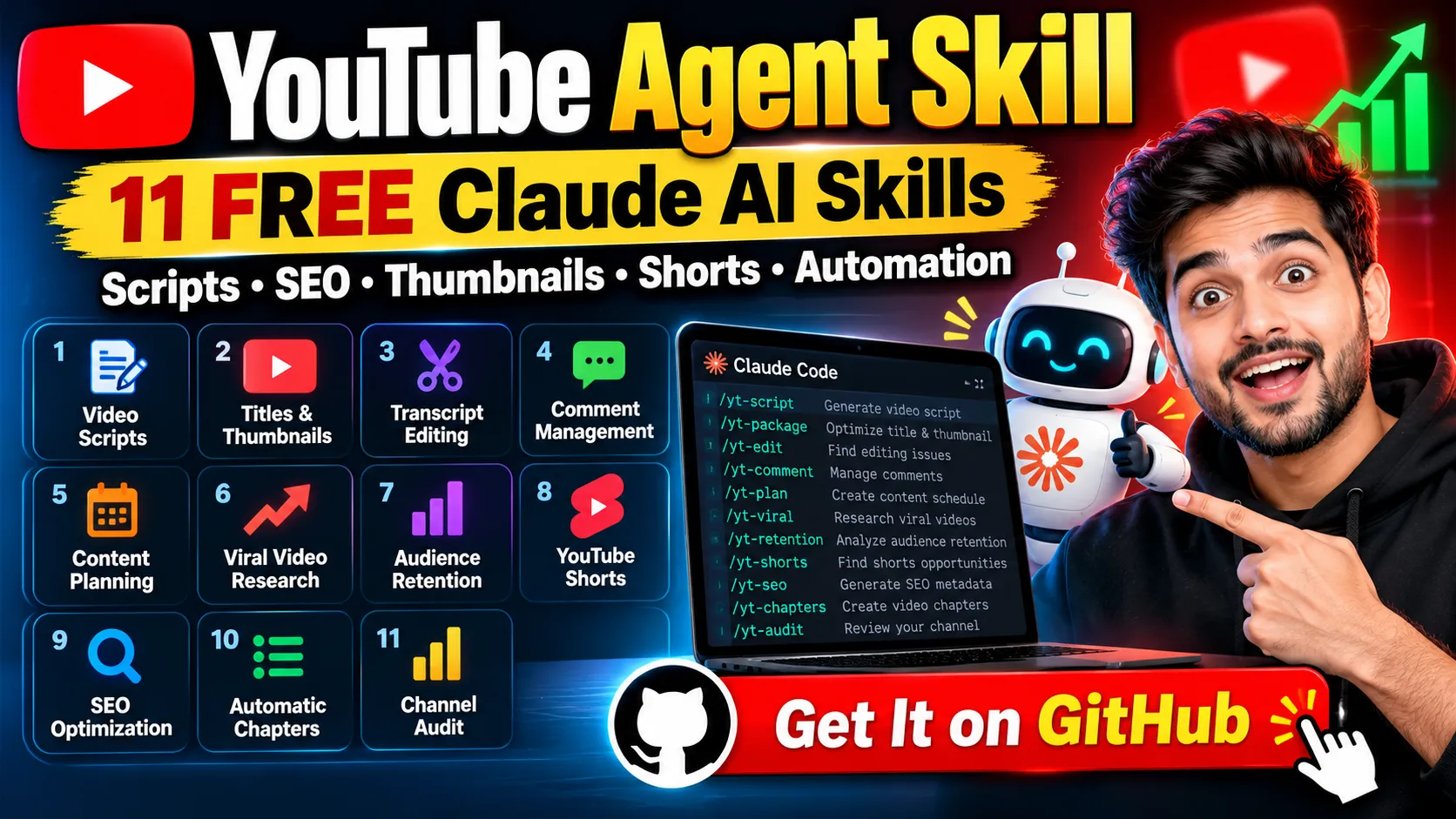
Discover YouTube Agent Skill, a free open-source Claude toolkit with 11 skills for video scripts, SEO, titles, thumbnails, Shorts, comments, and viral research. Learn how to install and use it.
YouTube Agent Skill setup guide, Claude AI for YouTube, YouTube automation tools, Claude Code skills, AI YouTube script generator, YouTube SEO tool, viral video research tool
What Is YouTube Agent Skill?
YouTube Agent Skill is a free, open-source toolkit designed to help YouTube creators manage important parts of their content workflow using Claude Code. It includes 11 specialized skills for video scripting, title and thumbnail planning, transcript editing, comment management, SEO optimization, channel auditing, and viral video research.
According to the setup guide, the project is available on GitHub under the MIT License. It also includes 6 Python tools and 21 hook formulas to support different content creation tasks.
The main idea is simple: instead of using separate prompts for every YouTube task, creators can use dedicated slash commands to perform specific jobs inside Claude Code.
For example, you can use /yt-script to generate a video script, /yt-seo to prepare video metadata, or /yt-viral to research videos that perform unusually well within a niche.
Important: YouTube Agent Skill assists with content preparation and analysis. It does not automatically publish videos to your YouTube channel. You remain responsible for reviewing and uploading the final content.
Get YouTube Agent Skill for Free
Open-source AI tools for YouTube creators
Key Features of YouTube Agent Skill
The toolkit is designed to help creators reduce repetitive work and organize their video production process.
1. AI YouTube Script Generator
The /yt-script command creates a script from a video idea. It generates five hook options using 21 hook formulas, scores them, and presents the two best hooks alongside a beat-by-beat script.
The output can include on-screen notes, an estimated runtime based on 150 words per minute, and an explanation of the selected hook formula.
This can be useful for technology tutorials, educational videos, gaming content, product explainers, and other YouTube niches.
2. YouTube Title and Thumbnail Optimization
The /yt-package skill evaluates a video title and its thumbnail together rather than treating them as unrelated elements.
It checks issues such as truncation, repeated wording, and vague terms. This can help creators develop a clearer title-thumbnail combination before publishing.
3. Automatic Transcript Editing Assistance
The /yt-edit skill works with a transcript and creates an edit decision list with timecodes for dead air, filler words, and retakes.
Editors can use these suggestions as a starting point when cleaning up a video timeline.
4. YouTube Comment Management
The /yt-comment command organizes pasted comments into four groups, drafts replies in the creator’s preferred voice, and suggests which comment to pin.
This feature may help creators handle comment discussions more efficiently while maintaining a consistent communication style.
5. Weekly YouTube Content Planning
The /yt-plan skill builds a content plan around the number of hours available to the creator.
The setup guide gives an example schedule containing one anchor video, one lower-effort video, and three Shorts. The actual plan depends on the time budget you provide.
6. Viral Video Research
The /yt-viral skill researches public video listings in a selected niche and compares each video’s views against its own channel’s median performance.
Rather than ranking videos only by total views, it highlights videos performing at least 2 times their channel’s median in the workflow described by the guide.
This makes it possible to discover smaller channels whose videos significantly outperform their usual results.
7. YouTube Audience Retention Analysis
The /yt-retention command analyzes a YouTube audience-retention CSV export to identify points where viewers leave, along with potential retention patterns.
Creators can use these findings to investigate weak introductions, confusing sections, or other parts of a video that may need improvement.
8. Long Video to YouTube Shorts
The /yt-shorts skill identifies potential Shorts within a long-video transcript and suggests a new opening line for each clip.
It can help creators repurpose existing material into short-form content, although the resulting clips and edits still need human review.
9. YouTube SEO Optimization
The /yt-seo command creates a video description, identifies tags worth keeping, and suggests three search queries related to the video topic.
This can help creators prepare their metadata in a more organized way. Remember that SEO recommendations cannot guarantee higher rankings or views.
10. Automatic YouTube Chapters
The /yt-chapters skill generates chapters from a transcript and checks them against YouTube’s chapter rules.
Chapters can make longer tutorials, reviews, and educational videos easier to navigate.
11. YouTube Channel Audit
The /yt-audit command reviews a channel using its link and concludes with one suggested fix rather than overwhelming the creator with a long list of unrelated recommendations.
This focused approach can help creators decide what to improve next.
YouTube Agent Skill: All 11 Commands at a Glance
| Command | Main purpose | Required input |
|---|---|---|
/yt-script | Generate a video script | Video idea |
/yt-package | Pair and review title and thumbnail | Topic or draft title |
/yt-edit | Find editing issues in a transcript | Transcript |
/yt-comment | Organize and reply to comments | Pasted comments |
/yt-plan | Create a content schedule | Available hours |
/yt-viral | Find above-median videos | Niche and channel examples |
/yt-retention | Analyze audience retention | Retention CSV |
/yt-shorts | Find Shorts opportunities | Transcript |
/yt-seo | Generate SEO metadata | Video topic |
/yt-chapters | Create video chapters | Transcript |
/yt-audit | Review a YouTube channel | Channel link |
Requirements Before Installing YouTube Agent Skill
According to the PDF setup guide, you need the following:
- Claude Code: The skills are intended to be installed and run in Claude Code, including its supported terminal, desktop, or IDE workflows.
- Python 3: Required for the six Python tools. The guide states that no additional Python packages need to be installed.
- Approximately 10 minutes: Recommended for creating your personalized voice file.
The guide also states that the setup does not require a separate API key, signup, or external account connection for the described workflow.
To check whether Python 3 is installed, run this command in your terminal:
python3 --versionIf the command is unavailable, install Python 3 from its official website before using the Python tools.
How to Install YouTube Agent Skill in Claude Code
The PDF describes four installation methods. The easiest option for most beginners is Method A.
Method A: Install Using the GitHub Link
- Open Claude Code.
- Copy the official repository link:
https://github.com/Jakeschincariol/youtube-agent-skill - Paste the link into Claude Code.
- Ask Claude Code to install the skill.
- Confirm that the
/yt-scriptcommand works.
You can use this installation request:
Install this skill:
https://github.com/Jakeschincariol/youtube-agent-skill

Follow the repository's installation instructions,
then confirm that /yt-script works.
After installation, try a simple command:
/yt-script why my first ten videos got no viewsThe expected output includes hook options, a script, on-screen notes, and an estimated runtime.
Method B: Install Manually Using Git
If you prefer to inspect and copy the skill files yourself, open a terminal and run:
mkdir -p ~/.claude/skills

git clone https://github.com/Jakeschincariol/youtube-agent-skill

cp -r youtube-agent-skill/skills/yt-* ~/.claude/skills/
This method places the skill folders in your Claude skills directory. Review the repository instructions if your environment or installation differs.
Method C: Install as a Claude Code Plugin
The guide also provides these commands for the plugin workflow:
/plugin marketplace add Jakeschincariol/youtube-agent-skill
/plugin install youtube-agent
Run them inside Claude Code, following the prompts provided by your installed version.
Method D: Install for One Project Only
If you only want the skills available within a particular project, copy the relevant yt-* folders into that project’s .claude/skills/ directory.
This keeps the installation project-specific rather than placing the skills in your user-level skills directory.
Which method should you choose? Start with Method A if you want the simplest installation. Choose Method B if you want to inspect the files before copying them.
How to Make YouTube Agent Skill Write in Your Style
One of the most useful parts of the setup guide is the voice.md file.
This file describes your audience, speaking style, preferred expressions, words to avoid, factual boundaries, and video format. The skills use it to make their output more consistent with your existing content.
Create Your Voice File
The fastest method described in the guide is to provide three of your own videos or transcripts to Claude and request:
Write my voice.md from these.Alternatively, use the supplied template:
mkdir -p ~/.claude/youtube

cp youtube-agent-skill/templates/voice.md \
   ~/.claude/youtube/voice.md
You can then customize the file to describe how you speak and structure your videos.
For example, if you create Hindi technology videos, explain your preferred language, how you introduce a new feature, how much technical detail your audience needs, and which expressions you naturally use.
The goal is to make scripts sound more like your established channel rather than generic AI-generated content.
How to Research Viral YouTube Videos with /yt-viral
The /yt-viral skill is particularly interesting for creators who want to understand what is working in their niche.
The setup guide describes this process:
- Select a niche and provide several relevant channels.
- Collect publicly available video listings, including titles, views, and links.
- Compare each video’s views with its channel’s median.
- Highlight videos that reach at least 2 times their channel’s median.
- Review the strongest examples to identify title patterns and shared structures.
- Use the research to develop a new video idea in your own voice.
The guide recommends supplying at least four videos per channel so the workflow can calculate a useful median.
For example, a video with 400,000 views on a channel whose median is 30,000 views performs about 13.3 times above that median. A video with the same 400,000 views on a channel whose median is 400,000 views performs at its normal level.
This comparison provides more context than total views alone.
However, a strong performance ratio does not prove why a video succeeded. Topic demand, audience loyalty, timing, packaging, and other factors can all contribute. Treat the results as research leads, not guaranteed viral formulas.
Six Python Tools Included in the Project
The repository’s six Python tools support several of the skills.
| Tool | What it does |
|---|---|
hookscore.py | Scores a video hook using five properties |
title.py | Checks a title and thumbnail as a pair |
deadair.py | Produces an edit decision list from a transcript |
chapters.py | Helps create chapters that meet YouTube’s rules |
retention.py | Examines retention data and where viewers leave |
swipe.py | Identifies videos that outperform their channel’s median |
The guide emphasizes that hook scoring is heuristic rather than predictive. A high score is not a promise of success, and a low score is a reason to review the hook rather than an automatic rejection.
Common Installation Problems and Fixes
The /yt-script Command Is Not Found
Close and reopen Claude Code, then check whether the skill folders exist:
ls ~/.claude/skills | grep yt-The guide says you should see 11 folders.
The Copy Command Reports “Not a Directory”
Create the missing directory first:
mkdir -p ~/.claude/skillsThen repeat the copy command from the installation instructions.
Python 3 Is Not Found
Install Python 3 from the official Python website and check the installation again:
python3 --version/yt-viral Skips a Channel
Check that the channel has at least four videos available for the research workflow. Add more videos or another relevant channel if necessary.
A Hook Score Looks Incorrect
Remember that the score is a heuristic, not a definitive measure of quality. Review the hook’s clarity, relevance, and appeal to your intended audience.
How to Update YouTube Agent Skill
The guide recommends pasting the repository link into Claude Code and asking it to update the installation. If you installed the repository through Git, you can also use git pull and copy the updated skill folders as needed.
Is YouTube Agent Skill Worth Using?
YouTube Agent Skill may be useful if you want to organize your content workflow around Claude Code instead of managing every task with separate prompts.
Its strengths include:
- A collection of 11 specialized YouTube skills.
- Support for scripts, titles, thumbnails, editing, comments, and SEO.
- A dedicated workflow for finding unusually successful videos.
- A reusable voice file for more consistent writing.
- Six Python tools that support the skills.
- An open-source MIT-licensed project.
There are also limitations to consider. The toolkit does not publish videos automatically, and its analysis is not a guarantee of views, audience retention, or channel growth. Some skills also require input files, transcripts, analytics exports, or public channel listings.
If you already use Claude Code and regularly create YouTube content, it is worth exploring the repository and testing the commands on a real video idea.
Frequently Asked Questions (FAQs)
1. What is YouTube Agent Skill?
YouTube Agent Skill is an open-source toolkit containing 11 Claude skills designed to assist with YouTube scripting, metadata, editing, comments, content planning, Shorts, retention analysis, viral research, and channel audits.
2. Is YouTube Agent Skill free?
Yes. The supplied setup guide describes the project as free to use and available under the MIT License.
3. Does YouTube Agent Skill require an API key?
The setup guide says the described workflow requires no API key or separate signup. You still need the appropriate Claude Code environment, and Python 3 is required for the six Python tools.
4. Can YouTube Agent Skill automatically upload videos?
No. According to the guide, it prepares content and analyzes public listings but does not publish videos to YouTube for you.
5. What does /yt-script do?
It generates five hook options using 21 formulas, scores them, presents the two strongest hooks, and creates a script with on-screen notes and an estimated runtime.
6. What is the purpose of voice.md?
The voice.md file describes your audience, tone, vocabulary, factual boundaries, and content format so the skills can produce work that better matches your established style.
7. How does /yt-viral find potential viral videos?
It compares video views against each channel’s own median and highlights videos that meet the workflow’s 2-times-median threshold.
8. Is YouTube Agent Skill suitable for beginners?
It can be useful for beginners who are comfortable following setup instructions and working with Claude Code. Those who are unfamiliar with terminals may need additional guidance during installation.
9. Can I use YouTube Agent Skill for Hindi YouTube videos?
Yes, you can provide Hindi video ideas and your own Hindi transcripts as inputs. Describe your language and speaking preferences in voice.md and review the generated content for accuracy and natural phrasing.
10. Where can I download YouTube Agent Skill?
Visit the official GitHub repository to review the source files and installation instructions:
Final Verdict
YouTube Agent Skill offers a practical collection of AI-assisted workflows for YouTube creators who want to streamline scripting, metadata preparation, transcript editing, content planning, and video research.
The best starting point is to install the skills, create a voice.md file from three of your own videos, and test /yt-script on your next video idea. From there, explore /yt-package, /yt-seo, and /yt-viral as needed.
Ready to try it? Visit the GitHub repository, follow the setup instructions, and experiment with the skills that fit your workflow.
Disclaimer: This article is based on the supplied YouTube Agent Skill setup guide. Features and installation instructions may change as the repository evolves. Review the official project documentation before installing or updating the toolkit.